Advanced editors5 min read
Make an AI Short step by step
Write a script, pick a look and a voice, then let TaleTok make it or check every scene first.
Open AI ShortsAI Shorts turns any script into a short with pictures, a narrator and captions. Setup takes three quick steps: Script, Look and Voice. Then you choose to let TaleTok make it straight away, or to check every scene first.
What it costs
- Low: 20 credits with still pictures, 100 with Full animation
- High: 40 credits with still pictures, 140 with Full animation
- Omega: 60 credits with still pictures, 160 with Full animation
Step 1: Script
Open AI Shorts in the sidebar.
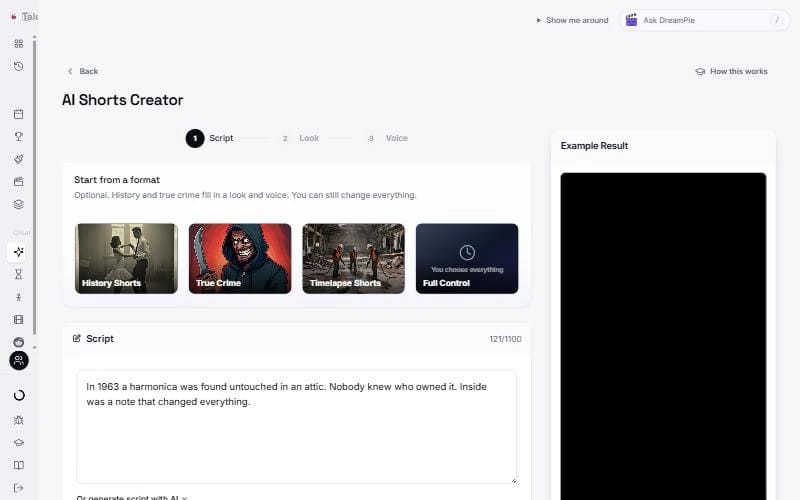
- Pick a starting point under Start from a format if you like: History Shorts or True Crime fill in a look and a voice. Timelapse Shorts takes you to the Timelapse editor. Full Control lets you set everything yourself.
- Paste your script into the Script box, up to 1,100 characters.
- No script yet? Turn on Or generate script with AI, add your topic and press Generate Script. Writing the script is free.
Press Continue.
Step 2: Look
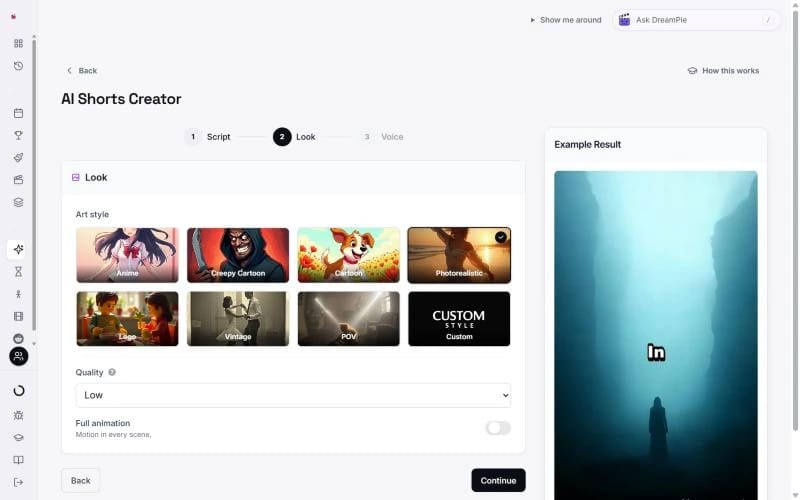
- Art style. Anime, Creepy Cartoon, Cartoon, Photorealistic, Lego, Vintage or POV. Pick Custom to describe your own.
- Quality. Low, High or Omega. Higher quality looks better and uses more credits.
- Full animation. Turn this on to make every scene move instead of using still pictures.
Press Continue.
Step 3: Voice
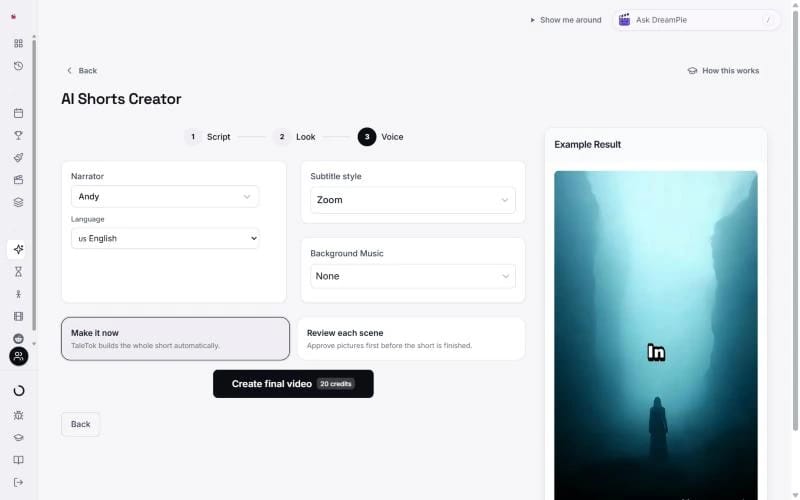
- Narrator. Press it to hear and pick a voice.
- Language. The language of the voice and captions.
- Subtitle style. How the captions look on screen.
- Background Music. Pick a track and set the volume, or choose None.
Choose how to make it
At the bottom you pick one of two ways:
- Make it now. TaleTok builds the whole short for you. Press Create final video and you are done. When it is ready, press Download or Schedule post.
- Review each scene. You approve the pictures first. Press Generate pictures and the short opens in the editor.
Check your scenes
Pictures appear on the timeline as they are drawn. Click a scene and use the Inspect tab on the right:
- Change the words in Frame prompt.
- Press Redraw frame. The button shows the credits, from 1 on Low.
The main button at the top right always shows the next step, such as Approve frames and animate and then Approve clips and render. When it says Render again, your short is ready.
Press Download MP4 to save it, or Schedule to YouTube to post it. The first redraw and the first new animation of each scene are free.
It is also saved in History in the sidebar.
Prefer the old screens?
Press Open in the classic editor at the bottom of the Make tab. It still has Regenerate, Edit prompt and Start over.
Keep learning
5 min read
Make a Zack D Films short step by step
Write a script, pick a voice, a look and your main character, then fine tune any shot in the editor.
5 min read
Review and finish your episode
Watch your first ten seconds, build the episode, approve every picture and render a long video ready to post.
4 min read
Make a Dark Story, 3D Documentary or explainer
Create everything in one click, change any scene, then render and download your episode.
2 min read
Change one scene without starting over
Fix a single picture or clip in any editor and keep everything else.