Post and grow2 min read
Connect your YouTube channel
Link your channel once to track growth and post videos straight from TaleTok.
Open StudioConnecting YouTube lets TaleTok post your videos for you and show how your channel is growing. You need a paid plan. Free accounts see Connect your channel when you upgrade.
How to connect
- Open Studio in the sidebar. Milestones and Autopost have the same badge.
- Press Connect at the top of the page, next to Go to. The Your channels window opens.
- Press Connect next to YouTube.
- Sign in with the Google account that owns your channel and allow access.
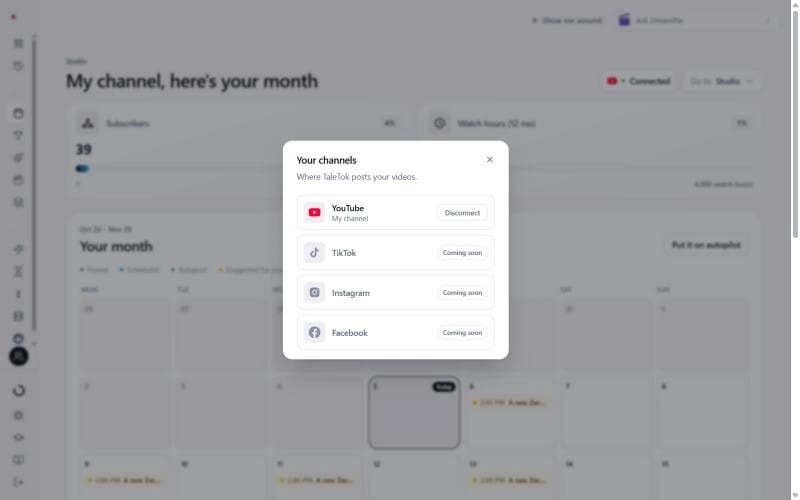
When it works the badge says Connected, and the window shows your channel name. If the badge says Reconnect, open it, press Reconnect and sign in again.
TikTok, Instagram and Facebook are coming soon. For now, download the MP4 and post it yourself.
What you get
- Your month in Studio. Subscribers, watch hours and a calendar of what goes out.
- Milestones. Your channel's numbers and your road to monetisation.
- Schedule to YouTube. Send finished videos to YouTube from any editor or from History.
- Autopost. Let a series post new videos for you on a schedule.
Want to disconnect?
Press the Connected badge, then Disconnect. Series stop autoposting until you reconnect. Nothing already on YouTube is changed.
Keep learning
2 min read
Schedule a finished video to YouTube
Pick a day and time and TaleTok posts your video for you.
3 min read
Autopost a series
Set up a series once and TaleTok makes and posts new videos on your schedule.
2 min read
Make every video look on brand
Pick a format, then set its look, clone a style and choose your narrator.
2 min read
Clone a style from a video link
Paste a video or picture and TaleTok makes a look for the format you are setting up.