Getting started3 min read
Make your first video
Pick a format, add a script and get a finished video, with what each one costs.
Open your dashboardTaleTok turns a script into a finished video with pictures, a voice and captions. You do not need any editing skills. This guide walks you through your very first one.
1. Pick a format
Open Home at the top of the sidebar and scroll to Start a video. Shorts are vertical and made for reach. Long form videos are made to earn on YouTube.
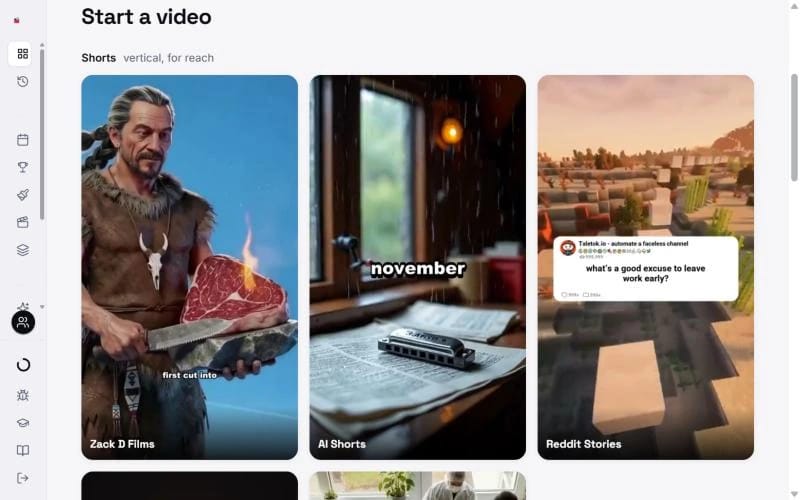
- Zack D Films makes 3D narrator shorts with a main character. From 135 credits.
- AI Shorts makes a short in any art style you like. From 20 credits.
- Reddit Stories turns a story into a gameplay video. From 10 credits.
- Pixel Facts turns a fact into a retro animated short. About 45 credits.
- Timelapse shows something being built from start to finish. From 50 credits.
- 2D Stickman, Dark Stories, 3D Documentary and the animated explainers are long videos. See Start a long video episode. A 10 minute 2D Stickman starts at 352 credits.
Not sure? Pick by what you want from your channel:
- Income: 2D Stickman long form. Videos over 8 minutes can carry ads in the middle and build watch hours.
- Views and reach: Zack D Films shorts.
- Both: run them together. Zack D Films shorts bring viewers in, and 2D Stickman or Dark Stories episodes earn from them.
2. Add your script
Paste a script, or let TaleTok write one for you. Writing it is free in Zack D Films and AI Shorts. Keep it short. A good Short is about 30 to 60 seconds when read out loud.
3. Choose the look and the voice
Pick an art style, a narrator voice and a caption style. Every narrator is included on every plan.
4. Make it
Press the button at the end of the setup to start. You see the credits before anything is charged.
When the video is ready, press Download MP4 to save it, or Schedule to YouTube to post it. Some older screens call these Download and Schedule post.
Where to find it later
Every finished video is saved in History in the sidebar. From there you can download it again or schedule it at any time.
Help when you are stuck
- Press Ask DreamPie at the top of any page, or the / key. It knows your plan, credits and projects. See Get help from DreamPie.
- Press Show me around next to it for a 30 second tour.
- Open Academy at the bottom of the sidebar for these guides.
Next steps
- Want to check every scene before it is finished? Read the guide for the AI Shorts editor.
- Want to post without lifting a finger? See Autopost a series.
Keep learning
3 min read
How credits and plans work
See what you have left, what every video costs and how to get more.
2 min read
Connect your YouTube channel
Link your channel once to track growth and post videos straight from TaleTok.
4 min read
Start a long video episode
Pick a format, give it a topic and choose the look and voice for a video that can earn money.
3 min read
When something does not look right
What to do if a video stops, a scene looks wrong or you cannot find your work.